DeepSeek Harness is now public in developer preview, and the first search wave is already highly practical: DeepSeek Harness GitHub, DeepSeek Harness npm, DeepSeek API key, and dsh. The official project answers those questions directly. DeepSeek Harness is an open-source agent harness developed by DeepSeek AI, and its command-line package is called dsh.
This is not another DeepSeek model. It is the layer that connects a model to a workspace, files, commands, a terminal, plans, delegated tasks, and an interface. The project's central claim is that everything is a plugin, an architecture powered by Cordis. In practical terms, that makes the default Web app one possible assembly of the system rather than the only product it can become.
The release is explicitly a developer preview. DeepSeek says the project is iterating quickly and that compatibility-breaking changes will happen. That matters: it is a reason to test the framework in a real repository, but not to pin a production workflow to an unversioned setup and assume the configuration will remain stable.
DeepSeek Harness GitHub and npm quick start
The official repository is github.com/deepseek-ai/deepseek-harness and is published under the MIT License. The quickest supported start is to install Node.js and run npx @deepseek-ai/dsh web. That command starts the Web UI at http://127.0.0.1:3080 by default. Developers who want to inspect or extend the project can clone the repository, install dependencies with pnpm, build it, and run pnpm dsh web from the checkout.
The Web UI uses the directory that launched dsh as its default filesystem location, but a new session still needs a selected workspace. That is a useful safety and usability boundary: starting the service does not silently hand an agent an arbitrary project directory.
How to add a DeepSeek API key
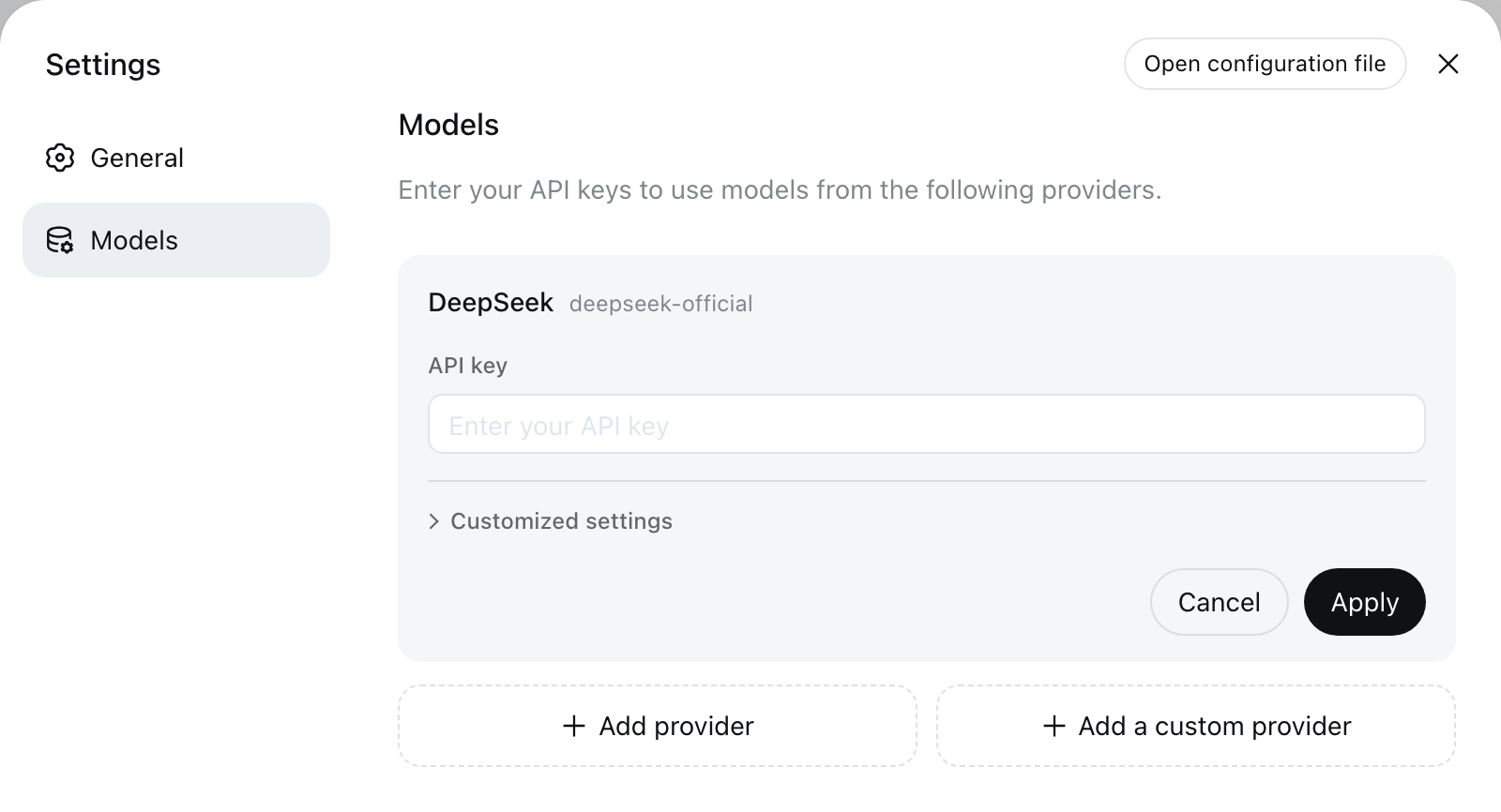
In the documented Web flow, open Settings, choose Models, enter a DeepSeek API key, and save. The model becomes available without restarting the server. The same configuration guide also covers custom OpenAI-compatible providers, so the framework is not restricted to one model endpoint.
Keep credentials out of source control. Use the app's credential flow or environment-based configuration for local and automated work, and do not paste a live API key into cordis.yml, a repository README, or a screenshot. A framework that can read files and run commands deserves the same credential discipline as any other local development tool.
What dsh adds beyond a chat window
Once a workspace and model are configured, DeepSeek Harness can read and edit files, execute commands, delegate work, and maintain a plan. The Web UI asks for approval when an operation requires it under the active permission policy. Those details are why the project is better understood as agent infrastructure than as a simple API client.
The useful first task is deliberately modest: ask the agent to summarize a repository and identify its main packages. From there, test it on a bounded issue with a clear acceptance check. Measure the result, retries, tool behavior, and review burden before handing it a broad codebase or a production credential.
Why DeepSeek Harness matters now
DeepSeek V4 gives developers a model route for coding and agent work. Harness provides the surrounding operating model: tool access, task structure, permissions, and a configurable runtime. The combination is notable because teams that want a DeepSeek-backed agent no longer have to treat the agent loop as an opaque feature inside somebody else's application.
The immediate opportunity is experimentation, not a premature replacement claim. Start with the GitHub repository, run the npm command, configure a key in a disposable local workspace, and follow the project's release notes as its developer-preview interfaces settle.
Sources and publication record
Source material is linked for readers who want to verify the underlying announcement or documentation.